Skip to content
Knot Migration · Knot Core extension

Audit and clone a Dolibarr before upgrading it.

Before each version upgrade, Knot Migration scans the instance, produces an actionable report and lets you clone it to a test environment or a new server. Locally, no cloud.
Knot Core extensionPrivate betaRead-only by default
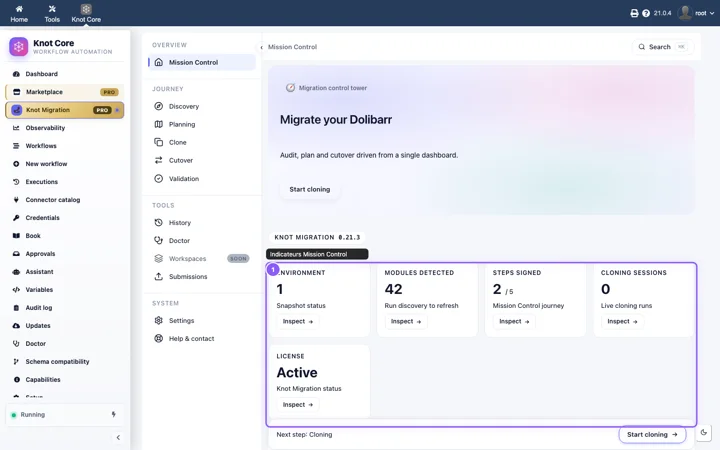
Knot Migration dashboard in Dolibarr: Discovery, Planning, Clone, Cutover, Validation
Knot Migration · Mission Control · real screenshot

What Knot Migration analyses

SQL schema

Diff between the target version and the current schema. Columns added, removed, renamed, indexes changed. The conflicts before the switch.

Third-party modules

List of installed modules and known compatibility with the target. Verified, at risk, unknown: the limit is stated.

Extrafields, workflows, integrations

Inventory of extrafields, Knot workflows, automations and external webhook or API calls.

Recommended strategy

Direct jump or step-by-step path, depending on the version delta and the detected risks.

What is in the report

  • SQL schema changes between the current version and the target
  • Installed third-party modules and known compatibility
  • Custom extrafields and associated data
  • Knot workflows and existing automations
  • External integrations (outgoing webhooks, API calls, cron jobs)
  • Data integrity (orphans, broken references)
  • Recommended strategy: direct jump or step-by-step path

After the migration, Knot Migration checks that everything is in place.

What Knot Migration does not do

An audit tool must say what it does not do as much as what it does.
  • By default, Knot Migration is read-only (audit, planning, checklists). A real upgrade or cutover execution is only possible with an explicit opt-in (setting and permission knotmigration.execute, verified backup). Responsibility and backup remain yours. See the beta access terms.
  • It does not guarantee a bug-free migration: human validation remains necessary.
  • It does not replace a backup. A full backup of the instance and custom modules remains your responsibility before any upgrade.
  • It does not cover unlisted third-party modules: the report says so.
  • It uses no LLM in V1.0: purely algorithmic analysis.

About effort estimates

The hour or budget ranges shown by Knot Migration (including the estimator in the planning flow) are strictly illustrative. They derive from fixed product rules, with no workload audit or contractual commitment: availability, scope trade-offs, regressions, third-party SLAs, SSO, DNS transfers or data volume can shift the order of magnitude.

Private beta offers

One licence per supervised Dolibarr instance. Updates included during the beta. The module runs entirely on your server; product telemetry is opt-in from its settings.

Solo

One instance, one operator

  • Full pre-upgrade audit
  • .kpkg cloning (export → transfer → import → validation)
  • Beta e-mail support
Request access · Solo

Multi-instance

Several Dolibarr environments

  • Integrators and multi-site SMEs
  • Audit and cloning across several licensed instances
  • One active entity per migration session
Request access · Multi-instance

Enterprise

Volume, SLA, onboarding

  • Large client base or regulatory constraints
  • Deployment support, dedicated runbooks
  • Custom quote
Request access · Enterprise

No public pricing during the beta and no payment on the site: contact by e-mail, then licence activation.

Instance cloning (.kpkg)

  1. Export

    On the source instance (wizard or CLI): a signed .kpkg package.

  2. Transfer

    To the target: SSH/SFTP path shown, HTTP download or browser upload (chunked), depending on the host.

  3. Import

    On the target, with explicit confirmation (destructive operation).

  4. Validation

    Post-clone report before any production cutover.

Synchronous exports suit databases up to about 200 MB. Beyond that, SSH/SFTP transfer remains the recommended path in beta.

Data transparency

Knot Migration runs locally on the Dolibarr instance. No customer data is sent to Knot Tools™. Snapshots stay on your server.
  • No business data is sent to Knot Tools™ during the audit or the cloning.
  • Snapshots (knot-migration-snapshot-v1.json) stay on your file system.
  • Post-clone validation reports stay on the target instance.
  • Product telemetry: explicit opt-in in the Knot Migration settings. Off by default.
  • End-of-run e-mail notifications: separate opt-in, through the local Dolibarr SMTP.

Privacy policy